
English-language version of Luistxo Fernandez's blog
DURL: who bookmarks what
Robin, a bilingual blogger, has invented DURL. You enter a url to retrieve information about people who delicious'ed it. For instance, tools.waglo.com/durl/http://www.ysearchblog.com/ and the result page has its own RSS, so you can track who bookmarks what at del.icio.us
Excellent idea!
One addition that I think could expand the capabilities of DURL or of the URL features of del.icio.us would be this: URL listings and RSS feeds by partial URLs.
I mean: Now DURL or del.icio.us offer information about a precise URL:
 http://del.icio.us/url?url=http://www.ysearchblog.com/
 http://tools.waglo.com/durl/http://www.ysearchblog.com/
But I would like an extended feature like:
 /url?url_extended=http://www.ysearchblog.com/
 or /durl_extended/http://www.ysearchblog.com/
That would list delicious'ed references to all URL's include that include that domain, for instance if anyone referenced to this or to this one
Such a tool would certainly enhance the ego of bloggers like me, that would immediatly subscribe to a feed from /durl_extended/http://www.eibar.org/blogak/luistxo/ to see who bookmarks which entry (and every entry) of my blog...
Of course, durl_extended should not substitute the actual DURL: it would be a different RSS feed the one provided by:
 /durl/http://www.ysearchblog.com/
 (bookmarks referring to that URL alone)
and the one by:
 /durl_extended/http://www.ysearchblog.com/
 (bookmarks referring to all subdirectories or else)
Basque demo of a OAI harvester and data-provider
This is a demo of a OAI harvester and data-provider. Its purpose is showing the capabilities of such a system, in this case offering a multilingual interface, applied to the context of the Basque Country and the Basque-language cultural production.
We used free software to do it, mainly ZOpenArchives and Localizer (Zope products) to produce the multilingual interface. ZOpenArchives is an OAI implementation for Zope that transforms Zope into an OAI Data Provider and Aggregator. Collaborative project
This Demo is the result of a collaborative project between CodeSyntax and DELi, a research group from the University of Deusto. The demo shows the capacity of OAI to function both as a data harvester (that includes a search interface) and as a data provider
The collection of OAI records used for this demo were kindly provided by several Basque institutions and publishers. Beware that most of the references correspond to Basque records, and general-purpose searches in English will not produce too much results... Follow the tips at the search page to obtain meaningful results.
The Basque context
Our purpose is to show in our local context that a Digital Library based on OAI's makes much sense. A minority language, Basque, where resources are many times scarce: it makes sense to promote a distributed model for a digital library. In our vision, a Basque digital library should not be like this:
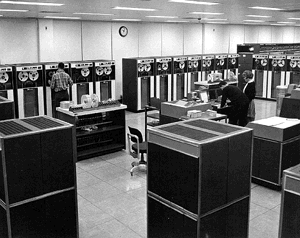
Not a central mainframe center, with gigantic centralised resources that everyone else should fill following N protocols... Rather, that Library should follow this model:
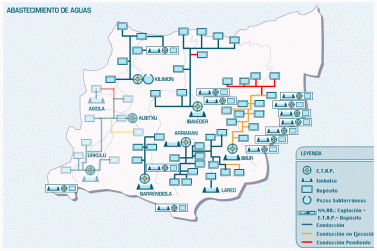
That's the hydrography map of a Basque region. Each council or county has its own responsability to maintain its own realtively small reservoirs. Then, there's a network connecting them. No need to feed a central system: anytime it rains here or there, water pours on the general system.
That could be the model for a Library, yes! Each one publishes its own records according to its resources, following the standard, and the network becomes the Library then.
What RSS is to news, OAI can be for books, cultural items, documentation at large... I am convinced of that. More about OAI at OpenArchives.org
Thanks
The following Basque organisations have contributed data to this demo:
- Badihardugu euskara elkartea, an association devoted to the study of local varieties of the Basque language.
- Gaztelupeko Hotsak, a music recording company.
- Gerediaga elkartea organiser of the Durango Fair.
- Inguma, a scientific database from the Basque Summer University Programme UEU.
- Megadenda.com, an online vendor set up by the book-distributing company Zabaltzen. The Basque publisher Elkar and its related software company Plazagunea have also contributed.
- Ibinagabeitia proiektua, a Basque online archive of literary journals developed by the publishing house Susa together with the ASP software company.
- Lanbide Ekimena, which is a documentation project for vocational training in the Basque Country, and is supported by several institutions: Hetel, Ikaslan, the Basque Government, BBK, Elhuyar and the regional administrations of Gipuzkoa and Bizkaia.
This OAI demo and the OAC project have the suppor of the Saiotek Research Programme from the Industry Department of the Basque Government.
Messages from the past in Coreblog
It's a nice feature in Coreblog that one you add an entry through the ZMI, you can change the date of the entry, putting your own "Entry date&time" in the field for it.
That way, you may post a message scheduled for next sunday, and it will be on the front page that day, not before. You may also rescue all writings from the past, and build an online archive of yours with the Coreblog.
However, there's a problem:
- Once an entry is added, no way to change its date format. Suppose you made a mistake with "Entry date&time": you can't edit that thereafter. Another time you need to do that is that, for some reason, a message you wrote one month ago becomes pertinent again, and you want it to be again at the frontpage with and updated date. No way.
You may change the text, title, edit comments, encodings, but nothing with the date. Only way is re-copying the content, deleting the entry, and add a new entry.
So, my question is, perhaps someone knows a trick at edit dates?
Year-by-year archive
On the other hand, I discovered a curious thing with past messages:
- You have entries of 2004 at your blog, the months that you have posts appear at the Archives section at the sidebar.
- But now you add past messages from may 2002 and october 2002: those months will not show.
- Another try: now you add a past message with date for june 2003: now the bug's corrected, not only June 2003, but October 2002 and May 2002 will appear also.
So, year-by-year continuity seems to be needed so the Archives section may work. If there's a discontinuity (one year with no posts), entries of the previous years will not appear at the Archive monthlist.
Blogplot, Coreblog community
I have just discovered Blogplot
It seems to be around for a year os so... But I didn't notice it.
Blogplot.com is now hosting free CoreBlog accounts. You will have access to all the standard features of CoreBlog with the capability to customize to your needs. You will also have access to all Zope products on our server in your CoreBlog instance. To get started simply email us with a subject line "Free CoreBlog Account" along with domain name information. You may register your own domain name and we will gladly manage your dns, or you can simply use a sub-domain of Blogplot.com (i.e. yourname.blogplot.com).
There are already a bunch of Coreblogs hosted there
well, I think it's worth to know there's Coreblog world outside Japan...
It's the second Coreblog community that I know, after our own at Eibar.org but well, theirs is in English and have more independent URL's than ours. However, our Coreblogs have a small fixed content editor for extra pages that comes handy.
Reading Eudora email through Google Desktop
Google Desktop is great. But, for personal email searching, it only supports Outlook. For users of other email programs, that's a disappointment. We know Outlook is evil. We know that is THE channel for virus expansion. We prefer the much nicer free alternatives.
So, here we are, the non-outlookers, waiting to Google Desktop to enhance its capabilities or for some clever person to create a trick, plug-in or whatever (just as Slogger makes Firefox navigation history searchable for GD).
I, Eudora user, was in that position also, but thought about making some tricks. And well, now I read and find my Eudora-stored messages through GD. This is an explanation of how I do it.
Disclaimer: this is neither a plug-in, nor a clever hack, but rather quite a dirty, dumb and somehow complicated solution. I dare to make it public in English because I see in the best Google Desktop tip collection or in the discussion group that there are no reports so far of GD being used with email programs other than Outlook. So please excuse the primitiveness of the trick (I'm not a techie guy) and my bad command of English.
The trick is, basically, use Outlook to store Eudora messages. So, as a premise, one shouldn't have uninstalled Outlook. However, you don't kneed to use Outlook. No need to configure it, to have it running on the PC: I think it's better not to configure it with your email connection details, that way you won't get viruses from it.
The very first time
So, go to Outlook:
- In Outlook Express, on the File menu, >> Import >> Messages
- Select Eudora. There are a couple of Netscape options, but don't know if they are compatible and appliable in this procedure, with Mozilla or Thunderbird.
- In the next interface, you are asked to browse your hard disk to find the Eudora messages. Normally, they should be here: C > Program Files > Qualcomm > Eudora. Select that Eudora folder.
- Select the mailboxes to import, and go on. That's it, almost...
- Almost, I say, 'cause if you have chosen all Eudora mailboxes, they have been all imported into Outlook except one: the In mailbox of Eudora (the Inbox, main entry platform for messages) is not recpgnised by Outlook apparently. So, to take those to Outlook, go back to Eudora, create a new provisional mailbox like, for instance, In-XX and transfer all messages from the Inbox there.
- Go back to Outlook, and repeat steps 1-2-3 but, BEWARE, when selecting mailboxes to import, only select In-XX. If you select a mailbox previously imported, messages are imported again: they will appear duplicated. Take care with that.
So far, we have imported all messages to Outlook. Give Google Desktop a couple of hours, it will index all that stuff. Messages will appear on searches, and when clicking on results, Outlook will not open: you read found emails from your browser of choice (I hope it's Firefox )
So, let's suppose you have followed all those steps 1-to-6 on Dec. 1. You will have at your disposal through Google Desktop messages you received or sent until that date. Yet, you still will use Eudora, receive and send new messages.
That means that we will need to repeat the process some time after this inaugural date. But, repeating all the process will duplicate messages unnecesarily at Outlook (see step 5 above). Therefore, steps 1-to-6 above are for the very first time only. Afterwards, things need to be done differently.
The following times
This is how I manage:
- Immediatly after that very first time Go to C > Program Files > Qualcomm > Eudora. Take all thos mbox'es there and copy them elsewhere, for instance in a folder named
Msgs-until-2004-12-01. (I will advice not to delete the messages: some day there will be some app to directly search mbox'es through Google Desktop or other tools). We are saving our email-memory as of Dec. 1. - Restart Eudora. Take all mailboxes, and delete all messages in all of them. (remember: you have now them reachable through Outlook and Google Desktop, and you have also saved the content in the previous case, juts in case).
- Keep using Eudora. For a month, for instance. Now it's New Year's eve, Dec. 31. Time for a new transfer to Outlook and Google Desktop.
- Like in step 1, go to C > Program Files > Qualcomm > Eudora. Take all the mbox'es again there and copy them elsewhere; this time save them in a folder named December2004. We are saving our email-memory of that month.
- Restart Eudora, create a new mailbox at Eudora and name it, for instance, Dec2004. Then, take all messages from all other mailboxes and transfer them to the Dec2004
- Now restart Outlook. on the File menu, >> Import >> Messages. On the interface, select Eudora.
- Browse your hard disk to find the Eudora messages: C > Program Files > Qualcomm > Eudora. Select that Eudora folder.
- Select the Dec2004 mailboxe and go on. Outlook will import all your messages of December.
- Now go to C > Program Files > Qualcomm > Eudora. Delete the Dec2004 mbox. Remember, that in step 4 you have saved all messages from that period.
- Let another month pass, and then repeat with Jan2005, and so on.
This strange procedure with Eudora may be used indirectly to let Outlook archive (and therefore let Google Desktop index and find) other email archives.
Importing other mbox'es
If you have email archives in the .mbox or .mbx formats (an standard originated in Unix used by several systems, among them Eudora or Mailman the list admin software), you can pass those messages to Outlook. Leaving those mbox'es somewhere and trying a direct import from Outlook doesn't work. But Eudora DOES recognise those files, and that's the way to do the trick:
- So, you have some mbox somewhere. Copy that to C > Program Files > Qualcomm > Eudora.
- Restart Eudora. You'll see a new mailbox with all the messages of that mbx.
- Repeat the import procedure from Outlook described above in this post. Be aware not to import the same thing twice, you know Outlook will duplicate messages.
There it is. If you have some Mailman list and want all your emails from that be indexed on your hard disk, searchable through Google Desktop, that's a way to do it.
OpenGroupware localised in Basque
My company CodeSyntax has produced the Basque version of OpenGroupware. We have put it into use in our own company and in several developments for customers.
Next you can see the schedule I had a month ago, the first week of November:

All Saints' Day, the day after Halloween, conveniently localised in Basque as Domu Santu eguna. See more screenshots there.
This Basque localisation, is already part of the official translation efforts registered at OpenGroupware.org
We have also connected OpenGroupware.org to Zope, integrating this tool into the CPS framework.
So, we may say that we have some experience installing and customizing OpenGroupware.org, the leading open source groupware server.
How could Bloglines fail so miserably with translations?
Unbelievable. The new language interfaces of Bloglines looked promising, but the result, at least in Spanish is plainly incredible.
For instance:
For su conveniencia, usted puede visi�n el website de Bloglines traducido a una diversa lengua. Usted puede elegir entre cualesquiera de las idiomas abajo. El chascar en el acoplamiento fijar� una galleta de modo que Bloglines sepa qu� lengua para utilizar cuando usted vuelve. Usted no tiene que ser entrado, ni tiene una cuenta de Bloglines, para utilizar esta caracter�stica, pero registering es easy!
How could this happen? One of the hottest projects of the net, obviously well conceived and with plentiful resources (in hardware, software and ideas) fails miserably...
Let's be positive, however.
They need to correct the mess, obviously, and they can do so, for instance, promoting an open translation environement, even for more languages, so users could download the original files and strings, and return their translations. As in the Google in Your Language, but, being more fair than Google us: if translations are user-generated content, let all translated string pairs (english / other) be copylefted and downloadable in a format apt for translation and l10n-i18n (.po, .tmx or some other).
GoogleAds at the English Cemetery
I've decided to add GoogleAds using the Adsense machinery to this blog. No hopes to become a millionaire. But perhaps we'll pay a round of red wine cups to my dear friends and members of the Eibar.org association that sustains this blog community.
Google ads will appear in the Spanish and English locales of the English Cemetery, not at the Basque locale. An arbitrary decision...
The layout for entries also changes. Now permalinked entries are shown with a sidebar.
Ego-searching raised to a higher order
An idea of mine gets some credit somewhere... Therefore, I want to keep account of its expansion.
I have a search option open at my Bloglines.com account crawling for the terms gmane blog interface. Results at Bloglines pointed me towards the Philippines.

I leave a comment at that site, and its webmaster Sacha Chua laughs at the method I used to find him: Ego-searching raised to a higher order. See Sacha's notes on 2004.11.10 and 2004.11.16
Yes.
Production stage for the blog interface at Gmane
My suggestions for a blog interface for Gmane have been put in production. Check this:
Even the four default designs... Well, they were just the first ones I got at hand for my alternate-CSS-design demo . The Lars design is particularly awful
See the running demos:
I think that Gmane needs just one default style. The rightmenu one has its origin in a creative-commons protected style (Rusty) that was listed at movablestyle.com ... Now the license mention has disappeared fron there.
I think they should find a free-content default style, acknowledging the origin, or create a custom Gmane-style from a friend designer or...
As I see, now it's the user who chooses the style to apply to all lists he/she is watchin'... I thought it would be the other way round. Each list admin could touch the CSS style of his/her list... So each list would have its own design.
This blog thing appeared at Gmane.discuss after Lars mentioned an admin interface and CSS changes. So, I thought it would be on admin's hands to apply a design. Logos or colours associated to projects could make the appeal of blog interaces more logical, that way.
Another option for an admin: The side menu has space for more things. If there was an admin interface, perhaps he/she could edit a section about so some lines with related links or a general explanation could appear at the side menu with the about caption.
The blog option is open to all lists and groups stored at Gmane. Just type the blog domain prefix and there it is: